Insights
WhatsApp Business Integration: A Developer’s Setup Guide

Use the WhatsApp Business Cloud API when you want full control over messaging infrastructure and lower per-message costs. Choose a Business Solution Provider (BSP) when speed to launch matters more than owning every technical layer. Both paths run on the same underlying WhatsApp Business Platform, so the decision comes down to your team and timeline, not the technology itself.
- Small team, tight deadline: a BSP gets you live in days with a hosted inbox and pre-built CRM connectors.
- In-house developers, custom CRM needs: direct Cloud API gives you full webhook control and no per-message markup.
- High message volume with compliance requirements: direct API access with your own audit trail is usually worth the setup effort.
Before touching any code, confirm you have a Facebook Page, a Meta Business Portfolio, and a Developer Account tied to your organization.
The integration you pick determines your ceiling on customization for years, not just your launch date.
Key Takeaways
Successful WhatsApp business integration depends on choosing Cloud API or a BSP based on your team’s capacity, then following Meta’s verification and template rules precisely to avoid delays.
| Point | Details |
|---|---|
| Pick your path early | Choose direct Cloud API for control and lower fees, or a BSP for faster launch without in-house developers. |
| Gather all six Meta assets first | Facebook Page, Business Portfolio, Developer Account, Meta App, WABA, and System User tokens must all exist before coding. |
| Start verification immediately | Business verification unlocks higher messaging tiers and often takes longer than the technical setup itself. |
| Build for reliability, not just launch | Use signature verification, deduplication, and retry logic from day one, not as a later fix. |
| Consider a managed build for speed | Quantum3 provisions accounts, hosts webhooks, and connects CRMs as one project for teams without spare engineering time. |
Table of Contents
- What Is WhatsApp Business Integration and Who Needs It?
- Core Meta Assets You Need Before You Start
- Cloud API or BSP? How to Choose Your Integration Path
- Step-by-Step: Setting Up the WhatsApp Business API
- Developer Resources for Testing and Debugging
- Message Templates and Compliance Rules You Can’t Skip
- Architecture Patterns for Connecting WhatsApp to Your CRM
- Security, Scaling, and Operational Readiness
- When to Bring in a Managed Integration Partner
- Get a Compliant WhatsApp Integration Live Without the Delays
- Frequently Asked Questions
- Sources
What Is WhatsApp Business Integration and Who Needs It?
The WhatsApp Business Platform (the Cloud API) is Meta’s programmatic interface for sending and receiving WhatsApp messages at scale from your own systems. It’s distinct from the WhatsApp Business App, the free mobile app meant for solo operators and small shops managing a handful of daily conversations by hand.
Businesses turn to WhatsApp business integration for four recurring jobs: order and appointment notifications, promotional and marketing outreach, commerce flows like catalog browsing and checkout, and live customer support. WhatsApp’s global footprint makes it one of the highest-reach messaging platforms available to businesses today, which is exactly why product teams increasingly treat it as a full conversational channel rather than an afterthought bolted onto email support.
- Notifications: shipping updates, appointment reminders, payment confirmations.
- Commerce: product catalogs, cart recovery, order status.
- Support: live agent handoff, FAQ automation, ticket deflection.
Core Meta Assets You Need Before You Start
You cannot skip account setup and jump straight to code. Meta’s WhatsApp API setup requires six interconnected assets, and missing one will block you partway through provisioning.
- Facebook Page — the public-facing entity your WABA connects to.
- Meta Business Portfolio (formerly Business Manager) — the container for all your business assets and permissions.
- Developer Account — registered at developers.facebook.com, needed to create and manage apps.
- Meta App — the technical object that holds your API credentials and webhook configuration.
- WhatsApp Business Account (WABA) — the account that actually sends and receives messages.
- System User with access tokens — the credential Meta recommends for production, replacing short-lived personal tokens.
These six pieces work together to form the full setup chain Meta documents for the platform. You can build and test most of this in sandbox mode with a temporary token before you ever touch a real phone number. Business verification, though, is a separate and often slower step. It’s required before you can add a production number or exceed entry-level messaging limits, so start it early rather than treating it as a last-minute formality.
Cloud API or BSP? How to Choose Your Integration Path
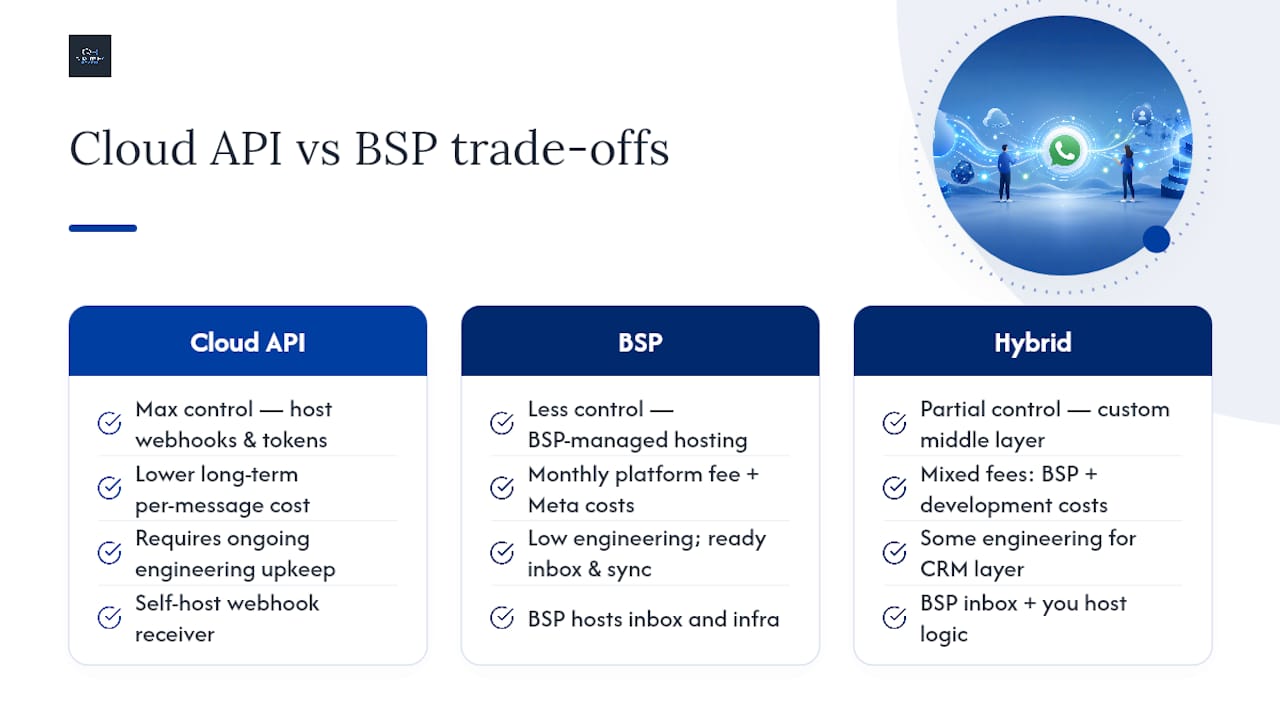
Direct Cloud API integration means you talk to Meta’s servers yourself: you host your own webhook receiver, manage your own tokens, and pay Meta’s per-conversation rates with no reseller markup. A BSP sits between you and Meta, offering a hosted inbox, pre-built CRM connectors, and support, usually for a monthly platform fee on top of Meta’s costs.
Direct Cloud API gives you the most control and the lowest long-term cost per message, but it demands ongoing engineering time for webhook maintenance, token rotation, and error handling.
BSPs trade some of that control for speed. If you lack an in-house development team, most implementation guides recommend a BSP specifically because it hands you a working inbox and CRM sync without writing infrastructure code.
Ask yourself: Do we have developers who can own webhook uptime? Is our message volume high enough that per-message reseller fees add up fast? Do we need custom routing logic a generic inbox can’t support? A hybrid approach, a BSP for inbox and agent tools paired with a custom middle layer for CRM logic, often works well for growing teams that outgrow simple support tools but aren’t ready to own full infrastructure.
Pro Tip: Start with a BSP if you’re unsure. Migrating from BSP to direct Cloud API later is far easier than the reverse, since your templates and WABA history carry over.
Step-by-Step: Setting Up the WhatsApp Business API
Here’s the sequence that takes you from an empty Meta account to a live, production-ready integration:
- Create your Meta App in the developer portal and add the WhatsApp product to it.
- Connect or create your WABA, linking it to your Meta Business Portfolio.
- Add a phone number — this can’t be a number already active on personal WhatsApp or the Business App.
- Generate a temporary access token to confirm your setup works before investing further.
- Set up webhooks and verify them; Meta expects a specific challenge response during verification.
- Create message templates for any business-initiated conversations and submit them for approval.
- Test everything using the sandbox and a test number, including inbound and outbound flows.
- Complete business verification — required before scaling past entry-level limits.
- Generate a permanent System User token and swap out the temporary one.
- Go live with your production phone number.
A full setup checklist covering these exact stages, from account creation through production, exists in Meta’s own documentation ecosystem and mirrors this flow closely. Store every ID and token in a secrets manager, never in application code. Pin your Graph API version at the start of the project. Template approval and business verification are the two steps most likely to stall your timeline, so submit both early and keep working on other steps while you wait.
Developer Resources for Testing and Debugging
Meta’s developer documentation is your primary reference for API calls, webhook payload shapes, and version changelogs. A typical test flow: generate a short-lived token, send a templated message to a verified test number using a POST request to /v{version}/{phone_number_id}/messages, then configure a webhook endpoint to catch delivery receipts and inbound replies.
- Use
ngrokor a similar tunnel to expose local webhook endpoints during development. - Test template variations early, since minor formatting differences can trigger rejection.
- Always verify the
X-Hub-Signature-256header on incoming webhooks to confirm requests actually came from Meta.
Pro Tip: Rotate your access tokens on a schedule, not just when something breaks. A leaked long-lived token with full messaging permissions is a bigger liability than most teams initially assume.
Message Templates and Compliance Rules You Can’t Skip
WhatsApp draws a hard line between two conversation types. Inside the 24-hour service window, triggered when a customer messages you first, you can send free-form replies. Outside that window, you must use a pre-approved message template, and business-initiated outreach always requires one regardless of timing.
Template rejections happen most often for promotional language disguised as a utility message, missing opt-out instructions, or formatting that doesn’t match your submitted sample exactly. Get these details right the first time. Resubmission adds days to your timeline.
- Collect explicit opt-in before adding any customer to a template-based campaign.
- Keep utility, marketing, and authentication templates in separate, clearly labeled categories.
- Watch your quality rating. Meta ties higher messaging tiers to both business verification and message quality, not just verification alone.
Regulatory scrutiny of workplace messaging tools is real, and businesses in regulated industries have faced audits over informal WhatsApp use by staff. That’s a strong argument for routing all business communication through the API, where conversations are logged and auditable, rather than through personal accounts.
Architecture Patterns for Connecting WhatsApp to Your CRM
A minimal, reliable setup looks like this: Cloud API sends events to your webhook receiver, which drops them onto a message queue, where a worker process handles CRM syncing, template dispatch, and retry logic asynchronously rather than inline.
- Map WhatsApp conversation IDs to CRM contact records at first contact, and keep that mapping idempotent so retries don’t create duplicate records.
- Use webhook-driven create and update events to keep your CRM as the source of truth for conversation history.
- Build or license a multi-agent inbox so multiple support staff can see the same conversation thread without stepping on each other.
- Store full message history separately from your CRM for compliance and searchability, since CRMs aren’t built as message archives.
Treating WhatsApp as a conversational bridge rather than a bolt-on ticketing channel, using interactive buttons and dynamic content, tends to produce better engagement than static broadcast messages.
Security, Scaling, and Operational Readiness
Every webhook endpoint needs HTTPS and signature verification, no exceptions. Give System Users the minimum permissions they actually need rather than blanket access.
- Watch your rate limits and build retry logic with exponential backoff for failed sends.
- Deduplicate incoming webhook events. Meta can and does deliver the same event more than once.
- Alert on webhook failures immediately. A silent failure here means missed customer replies.
- Plan for message volume growth. Verification unlocks higher tiers, but backpressure handling still matters at scale.
When to Bring in a Managed Integration Partner
Not every team has spare engineering capacity for provisioning, webhook hosting, and CRM mapping on top of a normal product roadmap. A managed integration typically covers full account provisioning, hosted and monitored webhooks, CRM connector setup, template strategy, and ongoing performance monitoring, all bundled instead of assembled piecemeal.

Hiring outside help makes the most sense when you have no in-house developers, an aggressive go-live date, or multi-region CRM requirements that add real complexity. Quantum3 builds this kind of infrastructure alongside broader AI and integration work for clients who’d rather launch fast than staff up internally.
Lessons from Real Integration Projects
Keep one dedicated test phone number throughout development. Switching numbers mid-project resets your template approval history and creates confusing bugs.
Test template permutations early, and pin your Graph API version before writing production code. Most timeline slips trace back to two things: underestimated verification wait times and unpinned API versions that shift behavior mid-build.
Get a Compliant WhatsApp Integration Live Without the Delays
Quantum3 handles the parts of WhatsApp business integration that eat the most engineering time: account provisioning, webhook hosting, template strategy, and CRM connector setup, delivered as one coordinated project instead of a stack of separate vendor tickets.
If your team has no spare developer bandwidth or you’re racing a launch date, that’s exactly the gap a managed build closes. Quantum3 pairs the integration with AI-driven automation so incoming WhatsApp conversations can trigger booking flows, CRM updates, and follow-up sequences without manual handling on your end. Reach out through the enquiries page to scope your setup and get a realistic go-live timeline before you commit engineering resources.
Frequently Asked Questions
Is the WhatsApp Business API free to use? Meta offers a free quota for service conversations in early tiers, but business-initiated messages and higher volume require completed verification and are billed per conversation.
Can I use my personal WhatsApp number for the API? No. Any number connected to a WABA can’t be actively used on the WhatsApp Business App or personal WhatsApp simultaneously.
How long does business verification take? Timelines vary, but it’s often the single biggest delay in a WhatsApp API setup, so start it as soon as you create your Business Portfolio rather than waiting until the technical work is done.
Do I need a developer to integrate WhatsApp for customer support? For direct Cloud API integration, yes. A BSP reduces that requirement significantly by providing a hosted inbox and pre-built connectors, though CRM mapping still benefits from technical input.
What happens if a message template gets rejected? You can revise and resubmit it, but each cycle costs time. Common rejection causes include promotional wording in utility templates and formatting that doesn’t match your sample exactly.
Sources
- WhatsApp Cloud API Get Started
- Complete WhatsApp Cloud API Setup Guide (2026) – From Facebook Account to Production Integration - DEV Community
- How to Get WhatsApp Business API Access: Setup Guide | SFAI Labs
Recommended
Want this for your business?
Tell us what you have in mind. A quick conversation is all it takes to scope it out.