Insights
Missed Call Text Back: Recover Leads Automatically

Set up an automated missed call text back that fires within 30–60 seconds, and you stop losing leads the moment a call goes unanswered. The fastest path is a managed setup combining an AI receptionist with automated text-back, which is exactly what Quantum3 handles end-to-end. If you want to move in the next 30 minutes, pick one of three paths: install a phone app, enable the feature inside your VoIP platform, or wire a Twilio/Zapier automation. Studies show that a well-timed text reply keeps the conversation alive when a caller would otherwise move on. U.S. businesses sending automated SMS from a 10-digit long code must complete 10DLC registration with their carrier to avoid delivery failures.
Table of Contents
- How does missed call text back actually work?
- Why missed call text back helps small businesses recover revenue
- When should you enable missed call text back?
- Step-by-step setup: three paths to go live fast
- Copy-ready missed call text templates for any industry
- U.S. compliance and deliverability: 10DLC, TCPA, and carrier rules
- What does missed call text back cost?
- How to test your setup and measure what it recovers
- How Quantum3 handles missed call text back for clients
- Key Takeaways
- Why voicemail is the wrong default for lead recovery
- Quantum3 turns missed calls into booked jobs
- Useful sources and further reading
How does missed call text back actually work?
The core flow is straightforward. A call comes in, goes unanswered, and the phone system detects the “no-answer” or “missed” status. That event fires a trigger, which selects a pre-written SMS template and sends it from your business number to the caller’s mobile. If the caller replies, the conversation routes to your inbox, CRM, or live agent.
Trigger variants you can configure:
- After X rings: — useful when you want to give staff a chance to pick up first
Sender choice matters more than most guides admit. A registered 10-digit long code (10DLC) gives you the best deliverability on standard mobile numbers in the U.S. Short codes send faster at high volume but cost more to provision. Toll-free numbers can work for SMS, but carrier and platform limitations mean toll-free tracking numbers may not support automated SMS at all, and landlines will never receive a text regardless of sender type.
Pro Tip: Register your 10DLC brand and campaign before you go live. Unregistered long codes are increasingly filtered by major U.S. carriers, and a text that never arrives is worse than no text at all.
Why missed call text back helps small businesses recover revenue
The business case is simple: a caller who gets no response within minutes is likely to call the next contractor on their list. An automated text reply changes that dynamic by keeping your business in the conversation.
“Sending an SMS within 30–60 seconds of a missed call re-engages callers before they move on. The message should include your business name, an acknowledgment of the missed call, a clear next step, and a realistic timeline for follow-up.” — NextPhone Setup Guide
For home-services businesses, the lift is concrete. Consider a plumbing contractor who misses a call during a job. Without text-back, that caller dials a competitor. With an auto-reply that says “Hi, this is Apex Plumbing — we missed your call and will reach you within 30 minutes. Reply to book now,” the caller has a reason to wait. That single recovered call can represent hundreds of dollars in revenue.
Beyond lead recovery, text-back opens a two-way channel. Callers can reply with their availability, confirm an appointment, or ask a quick question, all without waiting on hold. That conversational path also feeds your CRM automatically when the platform is wired correctly, giving you a record of every recovered contact.
When should you enable missed call text back?
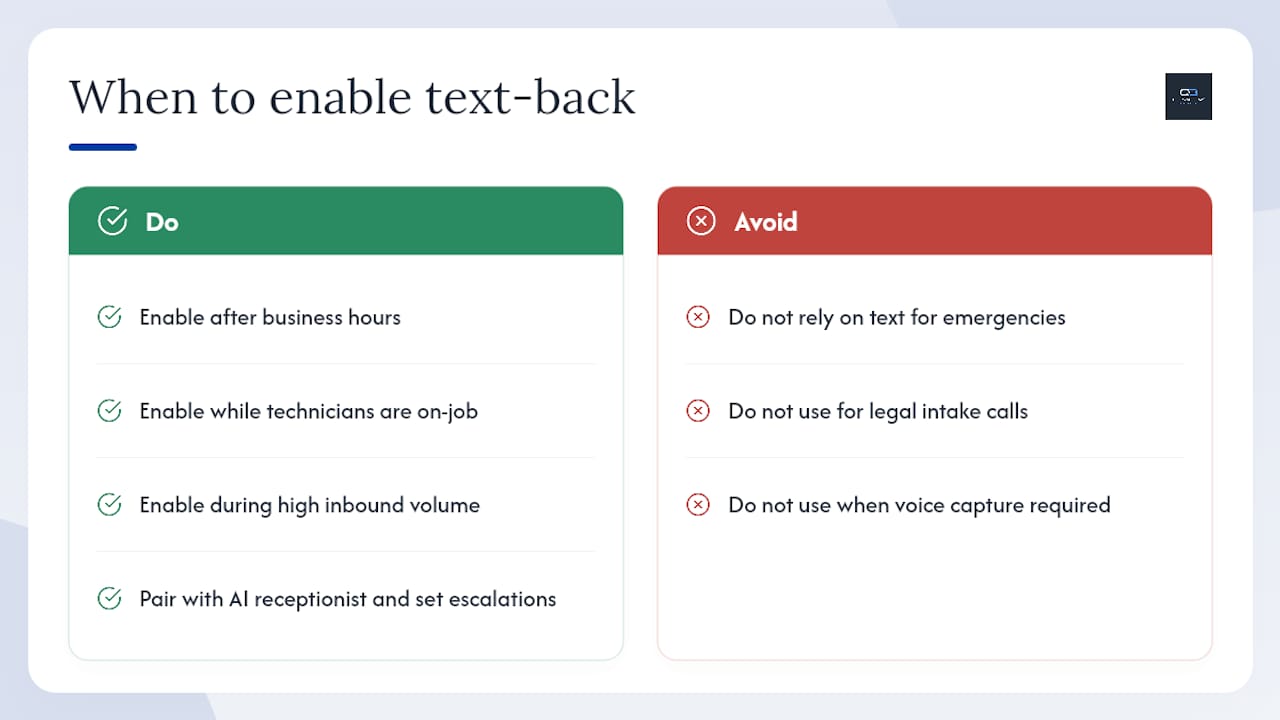
Text-back delivers the most value in four specific windows: after business hours, when technicians are on active jobs, during meetings or drive time, and during high-volume inbound periods when your team simply cannot answer every call.
After-hours is the clearest win. A caller who reaches voicemail at 7 PM has no expectation of an immediate human response, but a text that arrives within a minute keeps them engaged until morning. For contractors, the “on-job” window is equally valuable. A roofer on a ladder cannot answer a call, but an automated SMS reply can hold that lead until the job wraps.
When text-back alone is not enough: urgent emergencies, legal intake calls, and any situation where voice capture is legally or operationally required need a different solution. A water-damage restoration company, for example, should not rely on a text reply for a caller reporting an active flood. Those calls need live answering or an AI receptionist that can triage urgency.
Pro Tip: Pair text-back with an AI receptionist and set escalation rules for keywords like “emergency,” “urgent,” or “flooding.” The AI handles the call; the text-back serves as a backup confirmation. Quantum3’s AI integrations setup covers exactly this layered approach.
Step-by-step setup: three paths to go live fast
Path A: phone app (solo operators and micro-businesses)
Phone apps like Auto TextBack run locally on your Android device, require no server-side account, and can be live in under 15 minutes.
- Install the app and grant call-log and SMS permissions.
- Write your reply message (keep it under 160 characters).
- Set a cooldown period (20 minutes is a practical default) to prevent duplicate replies if the same person calls twice.
- Enable the app and test with a second phone number.
Cooldown and usage limits are built into most apps to avoid triggering carrier spam filters. The tradeoff: the phone must be on and connected, and the app cannot route replies to a CRM.
Path B: VoIP or business phone platform
Most business phone platforms include a Missed Call Text Back toggle in their phone system settings. Platform-native features let you enable the feature, customize the message with dynamic placeholders (caller name, business name), and set cooldown rules to prevent duplicate sends.
- Navigate to your phone system settings and locate the Missed Call Text Back section.
- Toggle the feature on and write your template message.
- Set your trigger (immediate, after voicemail, or after-hours only).
- Set a cooldown window (typically 20–30 minutes).
- Send a test call from a mobile number and confirm the reply arrives within 60 seconds.
- Verify the reply routes to your inbox or CRM.
Setup time for platform-native configurations typically runs 30 minutes to 2 hours, depending on how many integrations you need to wire.
Path C: Twilio + Zapier or Make (DIY automation)
This path gives you the most control and works across any phone system that exposes a webhook or call-status event.
- Provision a Twilio number and complete 10DLC registration for your brand and campaign.
- In Zapier or Make, create a trigger on the Twilio call status event “no-answer.”
- Add a Send SMS action using Twilio, with your template message as the body.
- Include error handling: if the SMS fails (e.g., landline detected), log the failure and trigger a callback task instead.
- Add a filter or tag check to prevent duplicate sends within your cooldown window.
- Test end-to-end with a mobile number and a landline to confirm both paths behave correctly.
Automation platforms like IFTTT also support missed-call-to-SMS triggers for Android devices, which is a lighter option if Twilio feels like overkill for your volume.
Testing checklist:
- Test during business hours and after-hours to confirm trigger timing
- Verify sender ID displays your business name or number correctly
- Confirm reply path routes to the right inbox or CRM record
- Test with both a mobile and a landline to confirm graceful handling
- Confirm STOP opt-out works and removes the contact from future auto-replies
Copy-ready missed call text templates for any industry
Every effective auto-reply includes five elements: your business name, acknowledgment of the missed call, a clear next step, a realistic timeline, and opt-out language. Keep messages under 160 characters to avoid multipart SMS fees and delivery complications.
Four ready-to-send templates:
- General: “Hi, this is [Business Name]. We missed your call and will follow up within 30 min. Reply to chat or book: [link]. Reply STOP to opt out.”
- Home services: “Hey, [Business Name] here — missed your call! We’ll call back within the hour. Need urgent help? Reply YES. Reply STOP to opt out.”
- Medical/dental: “Hi, this is [Practice Name]. We missed your call. Call us back at [number] or reply to schedule. Reply STOP to opt out.”
- Professional services: “Hi, [Firm Name] missed your call. We’ll reach you by [time]. Reply to confirm or reschedule. Reply STOP to opt out.”
Copy-use tips:
- Replace
[Business Name]with a merge field your platform supports (e.g.,{{location.name}}in most CRM-connected platforms). - Keep the booking link short using a URL shortener or a dedicated landing page. Quantum3’s landing page and funnel service can give you a conversion-optimized destination for those reply clicks.
- For medical and legal contexts, avoid any language that implies a diagnosis, legal advice, or guaranteed availability.
U.S. compliance and deliverability: 10DLC, TCPA, and carrier rules
What 10DLC registration means for your texts
10DLC (10-digit long code) registration is the U.S. carrier requirement for businesses sending application-to-person (A2P) SMS from standard 10-digit numbers. Without registration, major carriers including AT&T, T-Mobile, and Verizon will filter or block your automated texts. 10DLC registration improves deliverability and is required for any business sending automated messages at scale from a long code in the U.S. or Canada.
Implementation checklist:
- Register your brand with The Campaign Registry (TCR) through your SMS provider.
- Create a campaign use case (transactional/customer care fits most missed-call text-back scenarios).
- Assign your 10-digit number to the registered campaign.
- Include “Reply STOP to opt out” in every automated message.
- Monitor carrier delivery reports weekly for filtering or failure patterns.
TCPA basics for texting back a caller
Texting back someone who called you is generally treated as transactional communication, which carries a lower consent burden than promotional messaging. The caller initiated contact, which implies a reasonable expectation of a reply. That said, keep the initial auto-reply strictly informational. Any follow-up marketing message requires explicit written consent.
Pro Tip: Never include a promotional offer, discount, or upsell in the initial missed-call auto-reply. That single message is transactional. The moment you add “20% off your first service,” it becomes promotional and requires prior express written consent under TCPA rules.
Carrier constraints add another layer. Landlines cannot receive SMS, so your system needs a fallback (log the attempt, create a callback task). Toll-free numbers may not support automated SMS depending on your platform. Short codes bypass 10DLC requirements but require separate provisioning and approval.
What does missed call text back cost?
| Setup path | Typical monthly cost | Per-SMS cost | Setup time |
|---|---|---|---|
| Phone app (solo) | — | Carrier standard | Under 15 min |
| VoIP platform feature | Included in plan | Included or — | 30 min–2 hrs |
| Twilio + Zapier DIY | $20 (platform fees) | ~$0.007 per SMS (Twilio) | 2–6 hrs |
| Dedicated service with AI answering | Varies by provider | Typically bundled | Managed |
Practical limits to plan for:
- Most platforms throttle sends per number per day to stay within carrier guidelines.
- Cooldown rules (20–30 minutes) prevent duplicate replies but also mean a caller who rings twice in quick succession only gets one text.
- Messages over 160 characters split into multipart SMS, which carriers bill as two messages and which some filters treat differently.
- Estimate your monthly SMS cost by multiplying your average daily missed calls by 30, then by your per-SMS rate.
How to test your setup and measure what it recovers
End-to-end testing checklist
- Call your business number from a mobile and let it ring to no-answer. Confirm the text arrives within 60 seconds.
- Call again within your cooldown window. Confirm no second text fires.
- Call from a landline. Confirm the system logs the attempt and does not error out.
- Reply STOP from the test mobile. Confirm the opt-out registers and no further texts send.
- Reply with a message. Confirm it routes to your inbox or CRM contact record.
Key metrics to track
| Metric | What it tells you | Target |
|---|---|---|
| Missed-call recovery rate | % of missed calls that became a reply conversation | Track week-over-week |
| Reply rate | % of sent texts that received a reply | Higher = better message copy |
| Booking rate from replies | % of reply conversations that converted to an appointment | Ties text-back to revenue |
| Time to first response | Seconds from missed call to SMS sent | Under 60 seconds |
| Delivery rate | % of sent texts confirmed delivered by carrier | High percentage indicates healthy 10DLC setup |
Wire booking links with UTM parameters so you can attribute appointments back to the missed-call text-back flow in your analytics dashboard. A periodic audit every 30 days, checking delivery reports and deduplication logs, catches carrier filtering issues before they become a revenue problem.
How Quantum3 handles missed call text back for clients
Quantum3’s implementation goes beyond a simple toggle. The team wires an AI voice agent alongside automated text-back, so the AI attempts to answer the call first, and the text fires as a reinforcement if the call still goes unanswered. That layered approach means fewer missed calls reach the text-back stage at all.
What clients receive in a Quantum3 setup:
- 10DLC brand and campaign registration handled by the Quantum3 team
- Customized SMS templates matched to your industry and brand voice
- CRM integration so every reply conversation creates or updates a contact record
- Cooldown rules and deduplication logic configured from day one
- Real-time analytics dashboards showing recovery rate, reply rate, and booking conversions
- Monthly delivery monitoring with alerts for carrier filtering issues
Pro Tip: Ask your implementation team to set a 48-hour SLA on callback tasks generated from text replies. A caller who texts back but never gets a follow-up call is a recovered lead that still converts to zero.
The outcome clients typically see is a measurable lift in lead recovery within the first billing cycle, driven by the combination of AI answering and instant text-back rather than either tool alone.
Key Takeaways
Automated missed call text back, sent within 30–60 seconds and paired with an AI receptionist, is the most reliable way for small businesses to recover leads from unanswered calls.
| Point | Details |
|---|---|
| Send within 60 seconds | Texts sent within 30–60 seconds of a missed call re-engage callers before they move on. |
| Register 10DLC first | U.S. businesses must register their long code with TCR to avoid carrier filtering and delivery failures. |
| Keep messages under 160 characters | Staying under the single-SMS limit avoids multipart fees and reduces filter risk. |
| Track recovery and booking rates | Missed-call recovery rate and booking rate from replies are the two metrics that tie text-back to revenue. |
| Quantum3 handles the full setup | Quantum3 wires AI answering, text-back, 10DLC registration, CRM integration, and analytics in one managed engagement. |
Why voicemail is the wrong default for lead recovery
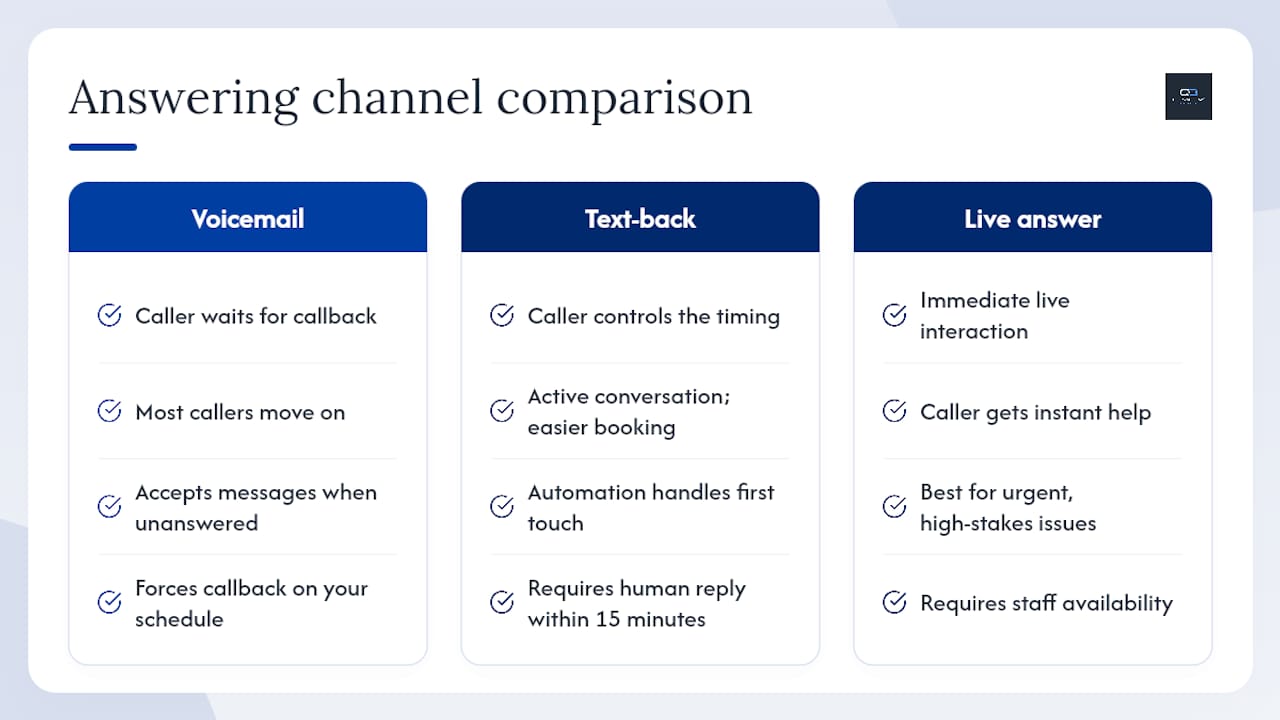
Most small businesses still treat voicemail as the fallback when no one answers. That is a costly assumption. A caller who reaches voicemail has already decided to leave a message, which means they are patient enough to wait. But the majority of callers who do not leave a voicemail, and that is most of them, have already moved on by the time you check your phone.
The real gap is not in answering speed. It is in the channel. Voicemail forces the caller to wait for a callback on your schedule. A text reply hands them control: they can respond when it suits them, share details in writing, and book without a phone tag loop. That shift from passive waiting to active conversation is where text-back earns its keep.
Where I see businesses go wrong is in treating text-back as a set-and-forget tool. The message goes out, the caller replies, and then nothing happens for hours because no one is watching the inbox. The automation handles the first touch perfectly. The human handoff is where leads die. Set a clear internal SLA: any text reply that comes in during business hours gets a human response within 15 minutes. After hours, the AI handles it. Without that rule, you have a fast first response and a slow close.
The other common mistake is over-relying on text for situations that need a voice. A caller describing a burst pipe or a legal deadline does not want a text thread. They want someone to pick up. Text-back is a lead-recovery tool, not a replacement for live answering in high-stakes situations. Use both, and let each do what it does best.
Quantum3 turns missed calls into booked jobs
Every missed call is a lead that already found you. The only question is whether your system is fast enough to hold their attention. Quantum3 builds the complete missed-call recovery stack: AI voice agent, automated text-back, 10DLC registration, CRM wiring, and a real-time analytics dashboard that shows you exactly how many leads you recovered this week.
The setup is managed from start to finish. You do not need to configure Twilio, register with TCR, or write your own SMS templates. Quantum3 handles the technical work so you can focus on the jobs, not the infrastructure behind them. Clients get a production-ready system, tested end-to-end, with cooldown rules and delivery monitoring already in place.
Ready to stop losing leads to unanswered calls? See how Quantum3’s AI integrations work and get your missed-call text-back system live within days, not weeks.
Useful sources and further reading
The sources below cover platform setup, 10DLC registration, compliance, and DIY automation in more detail.
- Missed Call Text Back: Setup Guide & Templates (2026) | NextPhone
- Automated responses for missed calls — CallRail Help Center
- Auto TextBack -Missed call SMS — Apps on Google Play
- Send Android SMS auto-reply
- How to Set Up Missed Call Text Back (Easy 2026 Guide)
- The Complete Guide to Missed-Call Text Back | WorkflowStack AI
Recommended
Want this for your business?
Tell us what you have in mind. A quick conversation is all it takes to scope it out.