Insights
CRM Website Integration: The Right Way to Connect Them

CRM website integration links your public site to your CRM so that every form fill, chat handoff, and checkout event lands in the system that actually runs sales, service, and marketing. Pick the architecture that matches your scale: a hub-and-spoke or iPaaS layer for mid-size and enterprise teams with frequent change, or a direct API plus native connectors for smaller teams with simpler needs. Most organizations see manual data entry drop and lead routing speed up within the first few weeks of a properly scoped build, though the full timeline depends on how many touchpoints you’re connecting.
Done right, this isn’t a weekend plugin install. CRM integration connects your CRM with internal and external platforms so data moves automatically and workflows trigger without a person copying and pasting between tabs. Getting there safely means thinking about OAuth-based authentication instead of shared passwords, and building consent and data-minimization into the pipeline from day one to stay aligned with GDPR. Agencies like Quantum3 typically run this as a phased build: map the touchpoints, choose the pattern, wire the connectors, test hard, then support it going forward rather than walking away after launch.
Key Takeaways
The right CRM website integration matches architecture to scale, treats data mapping as the foundation rather than an afterthought, and stays reliable only through active monitoring after launch.
| Point | Details |
|---|---|
| Match architecture to scale | Use native connectors for simple needs and hub-and-spoke or iPaaS patterns once you’re syncing several systems. |
| Define a system of record | Assign one authoritative source per object type (contact, deal, order) to prevent conflicting updates. |
| Separate real-time from batch | Sync forms and chat handoffs instantly; leave analytics aggregates for nightly batch jobs. |
| Build consent into the pipeline | Capture lawful basis and minimize synced fields to stay aligned with GDPR and UK-GDPR expectations. |
| Get expert help scoping and building | Quantum3 Studios runs discovery through ongoing support for CRM integrations across Salesforce, HubSpot, Dynamics 365, Zoho, and Pipedrive. |
Table of Contents
- Common Website Touchpoints That Send Data to a CRM
- Integration Methods: Plugins, Webhooks, APIs, and Middleware
- Data Mapping and Deduplication: Keeping Records Clean
- Tracking, Attribution, and Closing the Loop Back to Sales
- Security, Consent, and Compliance for Website-to-CRM Data Flows
- Testing, Monitoring, and Keeping the Integration Reliable After Launch
- Implementation Timeline and Cost Ranges by Business Size
- Notes on Common CRM Platforms and Their Integration Characteristics
- How Quantum3 Studios Builds and Supports These Integrations
- The Mistakes Quantum3 Sees Most Often
- Get Your CRM and Website Working Together With Quantum3 Studios
- What to Do Next
- Frequently Asked Questions
- Sources
Common Website Touchpoints That Send Data to a CRM
Before choosing a method, you need an honest inventory of every place your website already creates or updates a customer record. Most teams underestimate this list until they map it out.
- Lead capture forms — name, email, company, and the campaign UTM parameters that brought the visitor there.
- Live chat and chatbot/voice agent handoffs — conversation transcript, qualification answers, and a timestamp for when a human needs to take over.
- E-commerce checkout — product SKU, cart value, shipping address, and order status.
- Booking and scheduling widgets — appointment time, service type, and any pre-visit intake responses.
- Support portals — ticket subject, priority level, and account history tied to the same contact record.
- Content downloads (gated PDFs, webinars, demos) — the asset name, form data, and session context showing what page triggered the download.
Forms and chat handoffs almost always need real-time sync. A prospect asking a voice agent to book a call expects that appointment to show up in your CRM before the call happens, not the next morning. Analytics aggregates and reporting rollups can run on a batch or nightly schedule since nobody needs cart abandonment stats updated to the second. Getting this distinction wrong is one of the most common budget-wasters in integration projects. Teams build real-time infrastructure for data that only needed a nightly job, or they batch-sync a chat handoff and lose the prospect entirely.
Integration Methods: Plugins, Webhooks, APIs, and Middleware
Six approaches dominate the CRM website integration landscape, and each one fits a different combination of budget, technical skill, and long-term ambition.
A CMS plugin or native connector is the fastest path. Most CRMs ship a plugin for WordPress, Webflow, or Shopify that maps form fields to CRM fields with a few clicks. HTML form-posts send raw form data directly to a CRM endpoint with no middleware at all, which works for simple lead capture but breaks down the moment you need conditional logic or error handling. Webhooks push event data the instant something happens, like a completed checkout, making them ideal for near-real-time updates without constant polling. Direct API integration gives you full control over what data moves and when, at the cost of needing developer time to build and maintain it. Middleware and iPaaS platforms (integration-platform-as-a-service tools) sit between your website and CRM, handling transformation, retries, and routing across multiple systems at once. No-code automation tools like n8n or Make let non-developers wire simple triggers and actions together, which is often the right glue layer before you justify a full iPaaS investment.
| Method | Setup speed | Reliability at scale | Maintenance overhead |
|---|---|---|---|
| CMS plugin / native connector | Fast | Good for simple flows | Low |
| HTML form-post | Fast | Poor under complexity | Low, but fragile |
| Webhook | Moderate | Strong for event-driven data | Moderate |
| Direct API integration | Slow | Strong, fully controllable | High |
| Middleware / iPaaS | Moderate to slow | Strong across many systems | Moderate, centralized |
| No-code automation | Fast | Good for light workflows | Low to moderate |
The failure mode to watch for is point-to-point sprawl: a form-post here, a webhook there, a manual export somewhere else, until nobody can say with confidence where a given piece of customer data actually lives. Enterprise best practices treat integration as governed infrastructure with defined architectural patterns, not a pile of one-off scripts, and that discipline is what separates a system that scales from one that collapses under its own connections.
Pro Tip: If you’re connecting more than three systems to your CRM, skip the form-post approach entirely and start with a lightweight automation tool. Migrating off spaghetti connections later costs far more than building the glue layer correctly the first time.
Native connectors are enough when you have one CRM, one website platform, and simple lead capture. Add a no-code automation layer once you’re syncing two or three tools together. Plan for a full iPaaS or API-led architecture once you’re managing five or more systems, multiple business units, or strict compliance requirements that demand a documented, auditable data flow.
Data Mapping and Deduplication: Keeping Records Clean
Every CRM website integration eventually runs into the same question: which system wins when two sources disagree about a contact’s phone number? Answering that before you build anything saves months of cleanup later.
Start by naming a system of record for each object type. Your CRM should almost always own the contact and deal records. Your e-commerce platform might own order and inventory data, feeding summaries into the CRM rather than the other way around. This single decision prevents the two-way sync loops that cause duplicate records and phantom updates.
A basic field map looks like this:
| Website field | CRM field | Notes |
|---|---|---|
| Contact: Email | Primary match key | |
| First/Last Name | Contact: First/Last Name | Split from a single “Full Name” input if needed |
| Company | Company: Name | Fuzzy-matched against existing accounts |
| Form Source | Lead: Source Campaign | Populated from UTM parameters |
| Cart Value | Deal: Amount | Only synced on checkout completion |
For deduplication, build a checklist rather than hoping your CRM’s default matching logic catches everything:
- Match on email first, since it’s the most reliable unique identifier for most B2B contexts.
- Apply fuzzy matching on name and company for leads without a clean email match.
- Account for multi-device sessions where the same person fills out a form on mobile, then again on desktop days later.
- Set a tie-breaker rule for conflicting updates, typically “most recent write wins” unless a field is manually locked by a sales rep.
- Flag records for human review rather than auto-merging when confidence scores fall below a set threshold.
Custom fields deserve their own conversation early in scoping, because every CRM handles them differently, and a field that syncs cleanly in a sandbox can silently fail in production if the target field type doesn’t match.
Tracking, Attribution, and Closing the Loop Back to Sales
Marketing teams lose the attribution argument constantly, and it’s almost always because the campaign data never made it past the landing page. Fixing that takes a specific sequence:
- Capture UTM parameters (source, medium, campaign) the instant a visitor lands on your site.
- Persist that data in a cookie or local storage so it survives the trip across multiple pages.
- Write the captured campaign data to the CRM record the moment a lead is created, not after the fact.
- Tie the original campaign data to the closed opportunity so marketing can calculate which campaigns actually generate revenue, not just form fills.
The client-side versus server-side decision matters more than most teams realize. Client-side tracking (the JavaScript tag in your browser) is easy to set up but loses data to ad blockers, browser privacy settings, and script failures. Server-side tracking routes events through your own server before they reach analytics or CRM tools, which improves data fidelity and reduces the gaps caused by ad blockers and browser restrictions. The trade-off is that server-side setups take more engineering time and carry stricter obligations around what you collect and disclose.
Pro Tip: Store session context, like the number of pages visited before conversion and the specific content asset that triggered a form fill, directly on the contact record. Sales teams that see this context close deals faster because they know what the prospect actually cared about before the first call.
Once that context lives on the CRM record, lead scoring and routing rules can use it. A visitor who viewed pricing three times and downloaded a case study behaves very differently from someone who filled out a form after one page view, and your CRM should route those two leads to different follow-up cadences.

Security, Consent, and Compliance for Website-to-CRM Data Flows
Every CRM website integration is, at its core, a pipeline moving personal data across systems. Treat it that way from the first design conversation, not as an afterthought bolted on before launch.
- Use least-privilege credentials for every connector; a marketing automation tool that only needs to create contacts should never have delete permissions on your entire database.
- Authenticate with OAuth or dedicated service accounts rather than a shared admin login that five different tools all use.
- Encrypt data in transit with TLS on every connection, including internal ones between middleware and your CRM.
- Centralize credential management so API keys and tokens live in one secure vault, not scattered across individual developers’ config files.
- Log every write operation with an audit trail that shows what changed, when, and which system initiated it.
On the consent side, capture the lawful basis for processing at the point of collection, and only sync the fields you actually need. Sending your entire form payload to the CRM when you only need three fields for lead qualification is a data-minimization failure that GDPR and UK-GDPR both flag directly. Retention rules should match your stated policy; a contact who unsubscribed two years ago shouldn’t still be sitting in an active marketing sequence because nobody built a cleanup job.
Analytics and session-tracking tools carry their own disclosure requirements. Microsoft’s Clarity privacy documentation lays out exactly what a visitor-analytics tool captures and how that data gets handled, which is a useful reference point when deciding what your own tracking setup should disclose to visitors. Set an SLA for who monitors these integrations day to day, write a runbook for what happens when a sync fails silently, and store your audit trail somewhere immutable so a compliance review doesn’t turn into a scramble.
This article provides general information about CRM integration practices and is not a substitute for legal advice; confirm your specific data-protection obligations with a qualified professional familiar with your jurisdiction.
Testing, Monitoring, and Keeping the Integration Reliable After Launch
An integration that works in the demo and breaks in production is worse than no integration at all, because now your sales team trusts data that’s quietly wrong. Build the test plan before the first line of connector code, not after.
Testing checklist before go-live:
- Unit test every field mapping individually to confirm data types and formats match on both ends.
- Run end-to-end tests simulating the full form-to-CRM flow, including edge cases like special characters in names or extremely long form submissions.
- Load test for peak traffic, particularly if a product launch or ad campaign could spike form submissions well above normal volume.
- Define clear acceptance criteria before go-live: what percentage of test submissions must land correctly, and how fast, before you flip the switch on production traffic.
Ongoing monitoring and error handling:
- Set up automated health checks that ping the integration on a fixed schedule and alert a named owner the moment something fails.
- Build retry queues for transient failures, like a momentary API timeout, so a single blip doesn’t lose a lead permanently.
- Route messages that fail repeatedly into a dead-letter queue for manual review rather than letting them vanish silently.
- Run reconciliation jobs on a regular cadence that compare website submission counts against CRM record counts to catch records that fell through the cracks.
- Review a weekly run report as a standing habit, not just when someone complains that a lead went missing.
The single most common integration failure isn’t a crash.
Implementation Timeline and Cost Ranges by Business Size
Budgeting for a CRM website integration means matching scope to size honestly, since a five-page lead-gen site and a multi-brand e-commerce operation are not the same project.
- Quick native connector or form-post setup: roughly 1 to 2 weeks, appropriate for a single CRM, single website platform, and straightforward lead capture with no custom fields.
- Webhook-based integration with custom field mapping: roughly 2 to 4 weeks, appropriate for teams syncing deal data, custom objects, or multiple form types across a site.
- iPaaS or API-led multi-touch projects: roughly 8 to 16-plus weeks, appropriate for organizations connecting several systems, multiple business units, or strict compliance and audit requirements.
Cost ranges follow the same logic. DIY or native connectors typically run on a low monthly subscription fee with minimal setup cost. A small custom integration, built by an agency or freelance developer, is usually quoted as a fixed-fee project scoped to the specific touchpoints involved. Mid-size and enterprise builds using an iPaaS layer carry setup fees, recurring platform licensing costs, and dedicated engineering hours for ongoing maintenance, which is why strategic planning upfront pays for itself before a single connector gets built.
If you’re briefing an agency, come prepared with a discovery checklist: a full list of touchpoints, expected monthly lead or transaction volume, which system is the source of truth for each object, and any compliance constraints tied to your industry or region. An agency that asks for this before quoting a number is one that actually plans to deliver something maintainable.
Notes on Common CRM Platforms and Their Integration Characteristics
Not every CRM handles integration the same way, and the platform you’re already using shapes which methods make sense.
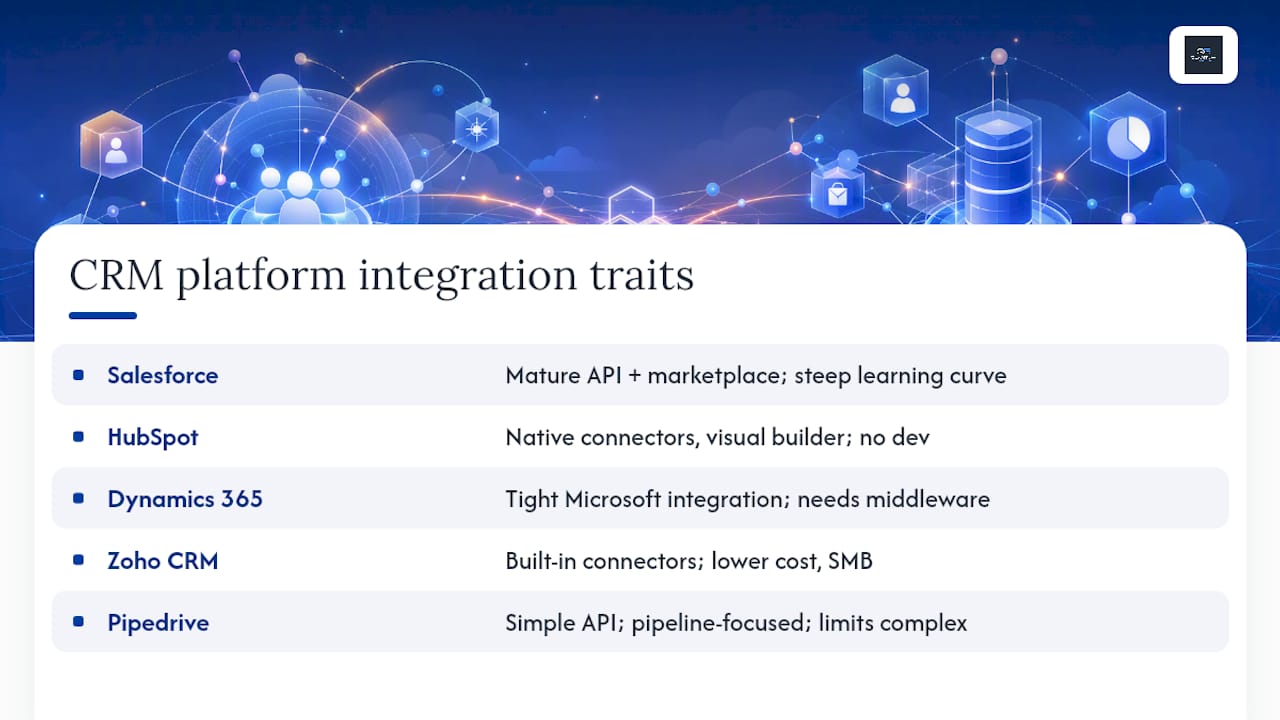
Salesforce has one of the most mature APIs on the market and a marketplace ecosystem (AppExchange) deep enough to cover almost any integration pattern, but that flexibility comes with a steeper technical learning curve for smaller teams. HubSpot leans heavily on native connectors and a visual automation builder (Operations Hub) that marketing-led teams can configure without a developer, making it one of the more approachable options for form-to-CRM flows. Microsoft Dynamics 365 integrates tightly with the broader Microsoft ecosystem, which is a real advantage for organizations already running Azure or Power Platform tools, though standalone website integration often benefits from added middleware. Zoho CRM offers a wide range of built-in connectors at a lower cost point, appealing to small and mid-size businesses that want breadth without enterprise pricing. Pipedrive keeps its API and native integrations simple and sales-pipeline focused, which suits smaller sales teams but can feel limiting for complex multi-object data models.
Marketing-led teams with limited developer resources generally do best on platforms with strong native connectors and no-code automation, like HubSpot or Zoho. Enterprise teams with dedicated engineering staff and complex compliance needs tend toward API-led builds on Salesforce or Dynamics 365, where custom architecture is worth the investment.
Whichever platform you choose, avoid vendor lock-in by leaning on standard APIs instead of proprietary shortcuts, documenting every field mapping outside the platform itself, and isolating your business logic in the integration layer rather than burying it inside a single vendor’s automation rules. That documentation is what lets you migrate CRMs in three years without starting from zero.
How Quantum3 Studios Builds and Supports These Integrations
Every CRM website integration Quantum3 delivers follows the same backbone, regardless of size: discovery, architecture and data modeling, build, test, staged rollout, then ongoing support. That order matters because skipping the data-modeling step is where most integrations quietly go wrong before a single line of connector code gets written.
A typical lead flow looks like this in practice: a visitor submits a form, the data gets validated and checked against existing records, enrichment adds missing company or contact detail where available, the CRM creates or updates the record, the event gets logged to a central event store, and a marketing automation trigger fires to start the follow-up sequence. Each step is visible and auditable rather than hidden inside a black-box script.
- Discovery sessions map every touchpoint before any code gets written, so scope is defined by data, not guesswork.
- Connector and automation builds include the AI voice agent handoffs and chatbot triggers that increasingly sit alongside traditional web forms.
- Staged rollouts test against a subset of live traffic before the full switch, catching mapping errors before they touch your entire pipeline.
- Support continues after launch, with monitoring and adjustments as the CRM, website, or campaign structure changes.
Quantum3 Studios positions itself as a full-service digital growth partner, not a build-and-disappear vendor. The emphasis on ongoing partnership and support, paired with smart automations woven into the integration itself, is what separates a maintained system from one that quietly breaks the moment a form field changes six months later.
That support model matters more than most buyers expect going in. An integration is never really “done.” Campaigns change, form fields get added, and CRMs push updates that can silently break a mapping that worked fine last quarter.
The Mistakes Quantum3 Sees Most Often
Ask any developer who’s inherited a client’s existing “integration” and you’ll hear a version of the same story: five different tools all writing to the CRM directly, nobody sure which one is authoritative, and a support ticket that starts with “our lead count doesn’t match what marketing is reporting.”
That’s point-to-point spaghetti, and it rarely happens because a team was careless. It happens because each connection got added under deadline pressure, one at a time, with nobody stepping back to ask whether the architecture still made sense. The fix is rarely more code. It’s choosing a single system of record for each object and defaulting every non-essential sync to one-way, which alone eliminates most of the conflicting-update problems teams fight for months.
A few warning signs come up constantly:
- No agreed system of record. If two people on the team would give different answers about which tool “owns” contact data, you already have a data-integrity problem waiting to surface.
- Too many two-way syncs. Every bidirectional connection doubles the number of ways two systems can disagree, and most integrations don’t need more than one or two truly two-way flows.
- Silent sync failures. A webhook that stops firing after an API version update can go unnoticed for weeks if nobody’s watching error logs.
- Missing ownership. An integration with no named human responsible for its health is an integration that fails quietly and stays broken.
The governance fix is almost boring in its simplicity: name a data owner, put a lightweight change-control process in place before anyone modifies a field mapping, and schedule a quarterly integration review instead of waiting for something to break. Teams that treat their CRM integration strategy as an ongoing discipline, rather than a project with an end date, are the ones who never end up explaining to leadership why the lead count doesn’t add up.
Get Your CRM and Website Working Together With Quantum3 Studios
A CRM website integration only pays off when someone treats it as a living system, not a one-time install, and that ongoing partnership is where Quantum3 Studios spends most of its energy. Rather than handing you a connector and disappearing, Quantum3 scopes the architecture, builds it, tests it against real traffic, and stays on to monitor it as your CRM, campaigns, and website evolve.
The engagement covers the full arc this guide just walked through:
- Discovery and data mapping to define your system of record before anything gets built.
- Connector and webhook development matched to your CRM, whether that’s Salesforce, HubSpot, Dynamics 365, Zoho, or Pipedrive.
- iPaaS orchestration for teams juggling more than two or three connected systems.
- Server-side tracking setup for attribution that survives ad blockers and browser privacy settings.
- Analytics dashboarding so your team sees integration health and lead flow in one place.
- An ongoing support retainer that keeps the integration monitored and adjusted as your stack changes.
Pricing is quoted transparently up front based on the touchpoints and systems involved, and most straightforward builds move from discovery to a working integration within weeks, not months. If you’re ready to stop losing leads between your website and your CRM, submit an enquiry and Quantum3 will scope the project against the discovery checklist covered earlier in this guide.
What to Do Next
- Map every touchpoint where your website currently sends or could send data to a CRM, including forms, chat, checkout, and bookings.
- Assign a system of record for each core object (contact, company, deal) before choosing any integration method.
- Decide sync direction for each connection, defaulting to one-way wherever a two-way sync isn’t strictly necessary.
- Choose your method based on complexity: native connector for simple flows, webhook plus mapping for moderate complexity, iPaaS for multi-system builds.
- Schedule a discovery call with your internal team or an agency, using the scoping checklist covered earlier to get an accurate cost and timeline estimate.
Frequently Asked Questions
What does CRM website integration actually mean? It means connecting your website’s forms, chat tools, and checkout flows directly to your CRM so customer data updates automatically instead of requiring manual entry. The core mechanism, as IBM describes it, is linking the CRM to other platforms so data syncs and workflows trigger across systems.
Which CRM is easiest to integrate with a website? HubSpot and Zoho CRM tend to be the easiest for marketing-led teams because of their native connectors and no-code automation builders. Salesforce and Microsoft Dynamics 365 offer more powerful API-led integration but usually require developer involvement to unlock that flexibility.
How long does a typical CRM website integration take? A simple native connector or form-post setup can go live in 1 to 2 weeks. Webhook-based integrations with custom field mapping typically take 2 to 4 weeks, while enterprise iPaaS projects with multiple systems can run 8 to 16 weeks or longer.
Do I need developer resources to integrate my CRM with my website? Not always. Native connectors and no-code automation tools can handle simple lead capture without a developer. Anything involving custom field mapping, webhooks, or multiple connected systems generally benefits from developer or agency support to avoid the point-to-point sprawl that causes long-term maintenance headaches.
What’s the biggest mistake businesses make with CRM integration? Building point-to-point connections without agreeing on a system of record for each data type. This creates conflicting updates and duplicate records that often go unnoticed until sales and marketing reports stop matching each other.
Sources
Marketing leads deciding how campaign data should flow into the CRM will get the most value from the attribution and tracking guidance covering native connectors and no-code automation paths. IT decision-makers scoping architecture should start with the enterprise integration best practices covering governance, security, and operational patterns, alongside the architecture pattern breakdown comparing point-to-point, hub-and-spoke, and event-driven models. Executives weighing the business case should read the practical case for fixing lead capture on websites that currently lose leads to broken handoffs. Anyone setting up analytics or session tracking as part of the build should also review Microsoft Clarity’s privacy documentation before finalizing what data gets captured and disclosed.
- Enterprise CRM Integration Best Practices | Architecture, Security & Operations
- What is CRM Integration? How It Transforms Business in 2026
- Clarity
Recommended
Want this for your business?
Tell us what you have in mind. A quick conversation is all it takes to scope it out.