Insights
Automated Appointment Booking for UK SMBs: 2026 Guide

If you run a UK small or medium business, the fastest safe route to working automated appointment booking is a managed integration that connects your calendar, payment gateway, and reminder system in a single configured flow. Done right, it cuts admin hours, reduces no-shows, collects payments at the point of booking, and keeps your data handling compliant with UK GDPR from day one.
The core case is straightforward. Businesses that automate their scheduling stop losing bookings to voicemail and email lag, collect deposits before appointments happen, and free staff from the back-and-forth of manual confirmation. A system that handles all three, calendar sync, payment collection, and automated reminders, pays for itself quickly in recovered revenue and reclaimed time.
Key Takeaways
A managed automated appointment booking system, covering calendar sync, payment collection, reminders, and GDPR compliance, is the fastest route to measurable results for UK SMBs with more than one provider or any payment handling requirement.
| Point | Details |
|---|---|
| Must-have features | Calendar sync, automated reminders, payment collection, intake forms, and multi-staff support are non-negotiable. |
| Typical costs | Budget for subscription fees, SMS credits, Stripe transaction fees, and a setup or retainer fee for managed implementations. |
| GDPR obligations | A privacy notice, lawful basis, DPA with your platform, and a data retention schedule are required before going live. |
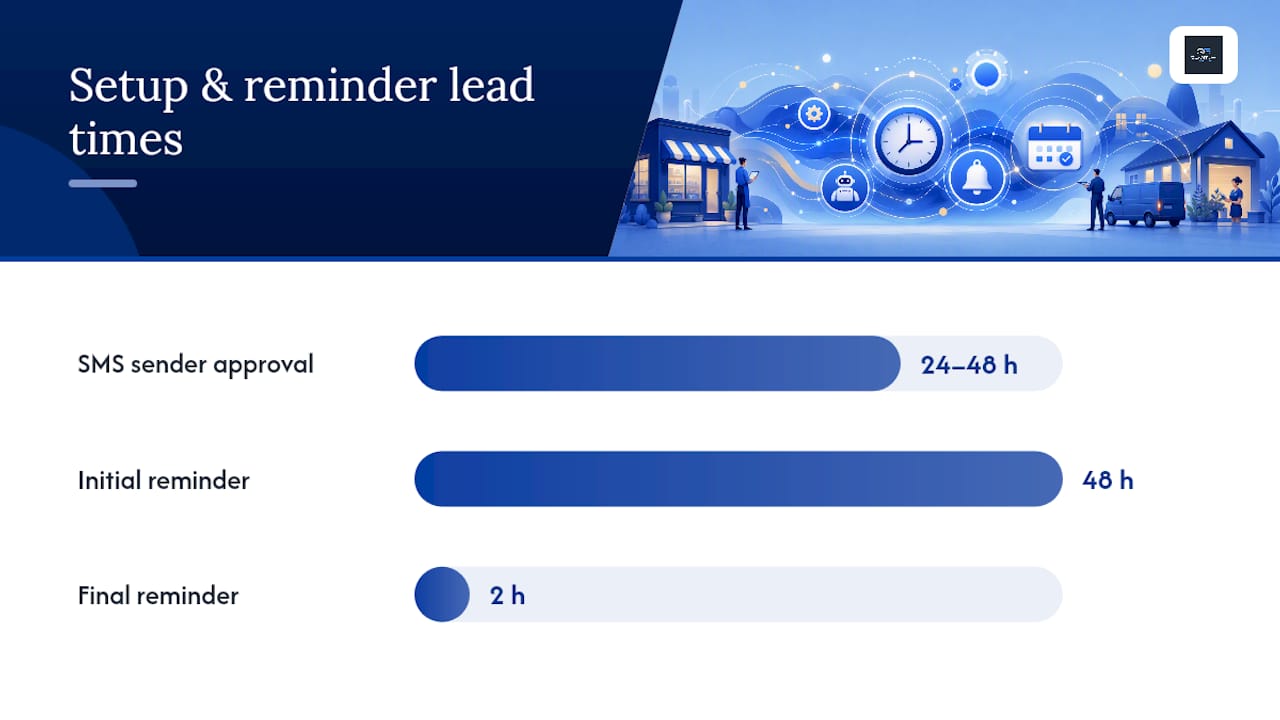
| No-show reduction | Automated SMS and email reminders at 48 hours and 2 hours before appointments are the highest-impact single configuration. |
| Recommended route | Quantum3 delivers a fixed-fee managed setup covering calendar, payments, CRM, and GDPR in 2–5 days with a 30-day support retainer. |
Table of Contents
- Why automated appointment booking matters for UK SMBs
- What core features does an automated booking system need?
- Which integrations unlock a fully automated booking workflow?
- How do you set up an automated booking system step by step?
- What does automated appointment booking typically cost for UK SMBs?
- What are your GDPR responsibilities when using a booking system?
- Should you set up booking automation yourself or hire a specialist?
- How does Quantum3 implement automated booking for UK businesses?
- What most businesses get wrong about scaling appointment booking
- Quantum3 handles the full booking setup for UK SMBs
- Sources
Why automated appointment booking matters for UK SMBs
Manual scheduling is a hidden cost most businesses underestimate. Every phone call to confirm an appointment, every email thread to reschedule, and every no-show that wasn’t caught by a reminder represents real money and real time lost. Appointment scheduling automation addresses all three at once.
The concrete benefits for UK SMBs break down clearly:
- 24/7 booking availability. Clients book at midnight, on weekends, or during your busiest hour without waiting for a callback. Bookings that would have been lost to friction convert instead.
- Fewer no-shows. Automated SMS and email reminders, sent well in advance before an appointment, consistently reduce no-show rates. Industry roundups place reminders and calendar sync at the top of every buyer checklist precisely because they have the most direct impact on attendance.
- Predictable cash flow. Collecting a deposit or full payment at booking via Stripe or another UK-compatible gateway means revenue is secured before the appointment date, not chased afterward.
- Reduced admin load. Staff stop manually entering appointments into calendars, sending confirmation emails, and fielding reschedule requests. That time goes back to billable work or client service.
- Higher conversion from enquiry to booked appointment. A shareable booking link, embedded in your website, email signature, or social profile, turns interest into a confirmed slot without a human in the loop.
For UK businesses, GDPR compliance adds a layer of obligation that a well-configured system handles automatically: encrypted data transmission, consent capture at booking, and a clear data retention policy baked into the platform settings.
A managed implementation shortens time-to-value considerably. Rather than spending days configuring integrations and troubleshooting calendar conflicts, a specialist sets up the architecture correctly from the start, so your first live bookings happen within a week.
What core features does an automated booking system need?
Appointment scheduling software varies widely in depth, but the features below are non-negotiable for any UK SMB that handles real clients, real payments, and real calendar constraints. Evaluate each one during a trial or demo before committing.
| Feature | Business effect | Acceptance test |
|---|---|---|
| Shareable booking page or embeddable widget | Clients self-book without staff involvement | Embed on your site and complete a test booking end-to-end |
| Two-way calendar sync | Prevents double-bookings across Google Calendar or Outlook | Block a slot manually in your calendar; confirm it disappears from the booking page |
| Automated SMS and email reminders | Reduces no-shows by prompting clients before their appointment | Book a test appointment and verify reminder delivery at configured intervals |
| Payment collection at booking | Secures revenue upfront via Stripe or equivalent UK gateway | Complete a test booking with a real card; confirm payment captured and receipt sent |
| Buffer rules and capacity limits | Prevents back-to-back bookings and over-scheduling | Set a buffer period; attempt to book the adjacent slot and confirm it is blocked |
| Intake forms and custom questions | Captures client information before the appointment | Add a required field; confirm it appears on the booking form and in the admin record |
| Multi-staff or multi-provider support | Assigns bookings to the correct team member | Create two providers; book each and confirm separate calendar entries |
| Reporting and analytics | Tracks booking volume, no-show rate, and revenue | Review the dashboard after five test bookings for accurate counts |
The Microsoft AppSource listing for scheduling add-ons illustrates how deeply calendar integration can reach into Outlook and Microsoft 365 environments, which matters if your team runs on Microsoft rather than Google Workspace.
Pro Tip: Test your booking system under realistic load before going live. Book five simultaneous appointments across two providers, then trigger a reschedule and a cancellation. If the calendar stays consistent and reminders fire correctly, the system is ready for real clients.
Which integrations unlock a fully automated booking workflow?
Three integration categories determine whether your automated scheduling system actually runs end-to-end or just handles the booking page.
Calendar and availability is the foundation. Without a live, two-way sync to Google Calendar or Outlook, your booking page will show slots that are already taken or block slots that are free. Google Workspace’s appointment scheduling resource documents how booking pages connect to Google Calendar with conflict detection and Stripe payment collection built in, which is a useful reference for what a well-integrated calendar layer looks like.

Payments is the second category. Stripe is the most common UK-compatible gateway for booking systems, handling card payments, deposits, and refunds. The connector typically requires an API key from your Stripe account and a webhook endpoint in the booking platform so payment confirmations trigger calendar entries automatically.
Communications and CRM closes the loop. SMS and email reminders need a delivery provider (Twilio, for example, or a platform with built-in SMS credits). Cloud communication guides explain the sender ID rules and per-message costs that affect reminder reliability in the UK market. CRM connections, via Zapier webhooks or native API integrations, push new booking records into your client database without manual data entry.
Four workflows cover the majority of SMB use cases:
- New client booking with payment and intake. Client selects a slot, completes an intake form, pays a deposit via Stripe, receives a confirmation email, and gets added to the CRM. A reminder fires 48 hours before the appointment.
- Sales demo with auto-join video link. Prospect books a demo slot; the system generates a Zoom or Microsoft Teams link and sends it in the confirmation. No manual link-sharing required.
- Service visit with travel buffer and staff assignment. A field-service business sets a 30-minute travel buffer between appointments. The system assigns the nearest available staff member and blocks adjacent slots automatically.
- Conversational booking via AI voice or chat. For businesses with high inbound enquiry volume, AI scheduling agents handle booking, rescheduling, and no-show follow-ups across SMS, web chat, and phone, integrating directly with calendars and payment systems. Quantum3’s AI integration capabilities cover this layer for businesses that need voice and chat booking alongside their web booking page.
Common failure points to watch: expired OAuth tokens breaking calendar sync, webhook timeouts dropping payment confirmations, and SMS sender IDs rejected by UK carriers. Build a monitoring check into your first 30 days post-launch.
How do you set up an automated booking system step by step?
The quickest valid route is: choose your core tools, connect calendar and payments, publish a booking page, and run five test bookings before going live. The numbered checklist below covers every step.
- Define appointment types and duration. List every service you offer, its length, and whether it requires a specific staff member or resource.
- Set staff schedules and buffer rules. Configure working hours, break times, and buffer periods between appointments for each provider.
- Connect your calendar. Authorize Google Calendar or Outlook via OAuth. Confirm two-way sync is active and that existing events block booking slots correctly.
- Connect Stripe for payments. Add your Stripe API keys, configure deposit amounts or full-payment requirements per appointment type, and set up refund rules.
- Add intake questions and terms. Build the intake form with only the fields you genuinely need (data minimization is a GDPR requirement). Add your cancellation policy and terms of service as a checkbox.
- Configure automated reminders. Set SMS and email reminders at 48 hours and 2 hours before each appointment. Add a post-appointment follow-up if you collect reviews or send aftercare instructions.
- Set rescheduling and cancellation rules. Define the minimum notice period for client-initiated changes and whether deposits are refundable within that window.
- Embed the booking widget or publish your booking page. Add the widget to your website’s contact or services page. Share the direct booking URL in your email signature and social profiles.
- Run a scripted test plan. Complete five test bookings across at least two appointment types and two providers. Force one reschedule and one cancellation. Confirm that calendar entries update, payments process correctly, reminders fire, and the CRM receives the records.
Setup tips worth noting: set your timezone explicitly in the platform settings (UK businesses should use Europe/London, not UTC, to handle BST correctly). For SMS reminders, register a sender ID with your provider in advance, since UK carriers can take 24–48 hours to approve new sender names. For multi-staff setups, assign calendar ownership per provider rather than sharing a single calendar, which prevents permission conflicts.
Pro Tip: Before going live, send your booking page URL to three people outside your business and ask them to complete a booking without any guidance. If they get stuck, the UX needs work before real clients see it.
Businesses that complete this setup correctly, with calendar sync, payment collection, and reminders all tested, typically see a measurable drop in no-shows within the first month. AI-assisted scheduling tools applied across hiring and service teams show how automation at the scheduling layer reduces manual coordination time across the board, a pattern that holds for client-facing booking as well.
What does automated appointment booking typically cost for UK SMBs?
Three pricing models cover most of the market. Understanding which one applies to your situation prevents budget surprises after launch.
Subscription tiers are the most common structure. Platforms charge a monthly or annual fee based on the number of users, locations, or appointment volume. Entry-level plans covering a single provider and basic reminders tend to sit at the lower end of the range. Multi-location or multi-staff plans with advanced resource scheduling cost more.
Per-booking fees appear on some platforms as an alternative or addition to subscription pricing. They suit businesses with low and unpredictable booking volumes but become expensive at scale.
Ancillary costs are where budgets often go wrong. The main ones for UK SMBs:
- SMS reminder credits. Most platforms charge per message sent. Cloud communication guides note that UK SMS delivery costs and sender ID registration add to the per-message rate. A business sending 200 reminders per month needs to factor this in.
- Payment gateway fees. Stripe charges a percentage plus a fixed amount per transaction on its standard UK pricing. Deposits collected at booking carry this fee on every transaction.
- Setup and integration fees. A DIY setup costs only your time. A managed integration from a specialist includes a fixed-fee configuration phase, typically covering discovery, connector setup, and QA.
- Monthly support retainer. Managed services often include a post-launch retainer covering reminder troubleshooting, calendar sync monitoring, and minor configuration changes.
A managed integration becomes cost-effective when the complexity of your scheduling rules, the number of providers, or the compliance requirements exceed what a non-technical team can configure reliably. The break-even point is usually reached within two to three months when you account for the staff time saved and the revenue recovered from reduced no-shows.
What are your GDPR responsibilities when using a booking system?
UK businesses collecting client data through a booking system are data controllers under UK GDPR. The obligations are specific and non-negotiable.
The core duty is to have a lawful basis for processing every piece of data you collect, to collect only what you need, to store it securely, and to have a clear retention policy. EU data-protection legislation sets out the framework that UK GDPR mirrors, covering processor contracts, consent requirements, and data subject rights.
Your GDPR checklist for a booking system:
- Privacy notice on the booking page. Clients must be told what data you collect, why, who processes it, and how long you keep it, before they submit their details.
- Lawful basis. For appointment booking, the lawful basis is usually “contract” (processing is necessary to fulfill the booking). Marketing follow-ups require separate consent.
- Data minimization. Collect only the fields you genuinely need. A name, email, phone number, and appointment type cover most use cases. Avoid collecting sensitive data unless the service requires it.
- Encryption in transit. Confirm the booking platform uses HTTPS and that any data sent to your CRM or payment gateway travels over encrypted connections.
- Data Processing Agreement (DPA). Your booking platform is a data processor. You must have a signed DPA in place with them before going live. Most reputable platforms provide this on request or include it in their terms.
- Data subject rights process. You need a documented process for handling access requests, deletion requests, and corrections within the statutory timeframes.
- Retention schedule. Define how long you keep booking records and configure automatic deletion or anonymization where the platform supports it.
Managed implementations that include a DPA review, a privacy notice update, and a short staff briefing reduce GDPR-related risk substantially in the months after launch.
Pro Tip: In your booking platform’s settings, disable any pre-ticked marketing consent boxes and set analytics to mask personally identifiable information. These two configuration changes alone close the most common GDPR gaps found in post-launch audits.
The Information Commissioner’s Office (ICO) is the UK’s supervisory authority for data protection. Their guidance on lawful basis and processor contracts is the primary reference for UK businesses, and it should sit alongside the EU consolidated text as a pre-launch checklist item.
Should you set up booking automation yourself or hire a specialist?
The decision rule is straightforward: single-provider businesses with simple scheduling and no payment integration can self-implement in a day or two. Multi-staff businesses, those handling payments and deposits, or any business with GDPR-sensitive data flows will reach a working, compliant system faster and more reliably with a managed integrator.
| Decision factor | DIY route | Managed integration |
|---|---|---|
| Number of providers | 1–2 | 3 or more |
| Payment collection required | No, or basic | Yes, with deposits and refunds |
| Calendar environments | Single Google Calendar | Outlook, Google, or mixed |
| CRM integration needed | No | Yes |
| GDPR compliance confidence | High internal capability | Prefer external review |
| Internal IT capacity | Available | Limited or none |
| Time to live booking page | 1–3 days | 2–5 days with full QA |
| Post-launch support | Self-managed | Retainer included |
The hidden cost of DIY at higher complexity is rework. Calendar sync breaks, payment webhooks time out, and reminder delivery fails in ways that are non-obvious to diagnose without experience. A managed integration catches these failure modes during QA rather than after a client misses an appointment.
For multi-staff scheduling and role-based access, the configuration layer alone, provider calendars, permission levels, and booking rules per service, adds enough complexity that a specialist’s fixed-fee setup typically costs less than the internal time spent troubleshooting it.
DIY quick-start: Choose a platform with native Stripe and Google Calendar support, follow the setup checklist in the previous section, and run the scripted test plan before publishing your booking page.
Managed route: Contact Quantum3 for a discovery audit and fixed-fee setup that covers calendar, payment, CRM, and GDPR configuration in a single engagement.
How does Quantum3 implement automated booking for UK businesses?
Quantum3’s approach to appointment scheduling automation starts with an integration-first architecture: a canonical event model, a single source-of-truth calendar sync, webhook-backed payment confirmations, and an analytics event stream for conversion tracking. The result is a booking system where every component talks to every other component reliably, rather than a collection of loosely connected tools.
The implementation follows a defined sequence:
- Discovery audit. Map your appointment types, staff structure, existing calendar environments, payment requirements, and GDPR obligations before any configuration begins.
- Architecture and integration design. Define the data flow: booking page to calendar, calendar to CRM, payment confirmation to booking record, reminder triggers to SMS/email provider.
- Calendar and payment connector setup. Configure OAuth connections for Google Calendar or Outlook, Stripe API keys and webhooks, and SMS delivery credentials.
- Booking page and widget development. Build a branded booking page or embeddable widget that matches your site’s design, with intake forms, terms acceptance, and payment collection built in.
- QA and GDPR checks. Run the scripted test plan across all appointment types and providers. Review privacy notice, DPA status, data minimization settings, and retention configuration.
- Launch and analytics dashboarding. Go live with real-time tracking of booking volume, conversion rate from page visit to confirmed appointment, no-show rate, and revenue collected at booking.
- Post-launch support retainer. A 30-day stabilization period covers reminder troubleshooting, calendar sync monitoring, and configuration adjustments as real booking patterns emerge.
Typical managed engagements include a fixed-fee discovery and configuration phase of 2–5 days, followed by connector setup covering calendar, payment, and CRM, and a 30-day support retainer to stabilize reminders, rescheduling flows, and no-show reduction. Clients receive a fully documented system: integration map, GDPR records of processing activities, staff admin guide, and a live analytics dashboard.
Performance metrics Quantum3 tracks post-launch include reduction in admin hours per week, no-show rate before and after reminders, bookings per week uplift from 24/7 availability, and revenue collected at booking versus invoiced after the fact. These are the numbers that tell you whether the system is working.
What most businesses get wrong about scaling appointment booking
The conventional wisdom says: pick a platform, follow the setup wizard, and you’re done. That framing works for a solo practitioner booking one type of appointment with no payment handling. It breaks down fast for anyone with two or more providers, a mix of calendar environments, or clients who expect a deposit at booking.
The pitfalls that appear most often in real implementations are calendar conflicts caused by shared calendar permissions rather than per-provider calendar ownership, intake forms that collect far more data than the service requires (a GDPR liability hiding in plain sight), and reminder delivery failures caused by unregistered SMS sender IDs that UK carriers silently drop. None of these are obvious during a platform trial. All of them surface within the first two weeks of live bookings.
The deeper issue is that most businesses treat booking automation as a tool selection problem when it’s actually an integration design problem. The platform matters less than the architecture connecting it to your calendar, your payment gateway, and your CRM. A well-configured mid-tier platform outperforms a poorly integrated premium one every time.
For businesses moving from a DIY setup to a managed solution, the transition is usually triggered by one of three events: a double-booking that cost a client relationship, a GDPR query they couldn’t answer, or a no-show rate that didn’t drop despite having reminders configured. If any of those sound familiar, the architecture needs a review before adding more features.
Quantum3 handles the full booking setup for UK SMBs
UK small and medium businesses that need working appointment booking, payment collection, and GDPR-compliant data flows in under a week have a direct route: Quantum3’s managed implementation service, built specifically for businesses that can’t afford to spend weeks troubleshooting calendar sync and webhook failures.
The service covers everything from discovery audit to live booking page: calendar and Stripe connector setup, branded booking widget, intake forms, automated reminders, GDPR documentation, and a 30-day post-launch support retainer. Fixed-fee pricing means no open-ended agency invoices. The typical engagement runs 2–5 days from kickoff to a tested, live system.
For businesses that want conversational booking via AI voice or chat alongside a web booking page, Quantum3’s AI integration service extends the same architecture to SMS, phone, and chat channels.
Ready to move from manual scheduling to a system that books, reminds, and collects payment automatically? Request a setup consultation or review the full service catalog to see which engagement model fits your business.
Sources
The resources below are the primary references for compliance, integration documentation, and feature validation. Use them as a pre-launch checklist alongside your platform’s own documentation.
- Eur-lex
- Zapier — The 5 best appointment schedulers and booking apps
- Cloud Based Communication Platform: 2026 Guide for Small Business
Use the ICO and EU data-protection sources as your GDPR pre-launch checklist. Use the Stripe and Google Workspace docs as your integration configuration references.
Recommended
Want this for your business?
Tell us what you have in mind. A quick conversation is all it takes to scope it out.